In an age of constant notifications and digital distractions, what is the true cost of focus? The average professional is interrupted every few minutes, shattering concentration and derailing deep work. This is the problem that premium writing tablets aim to solve, and in 2025, no device does it with more elegance and intention than the reMarkable 2. It’s more than just a gadget; it’s a statement against the digital noise.
This isn’t your typical iPad competitor. The reMarkable 2 is a dedicated digital writing pad designed to replace your paper notebooks, sketches, and printed documents with a single, distraction-free device. In this comprehensive review, we’ll dive deep into its features, performance, and ultimate value to help you decide if this is the best writing tablet to revolutionize your workflow and reclaim your focus.
Product Overview:
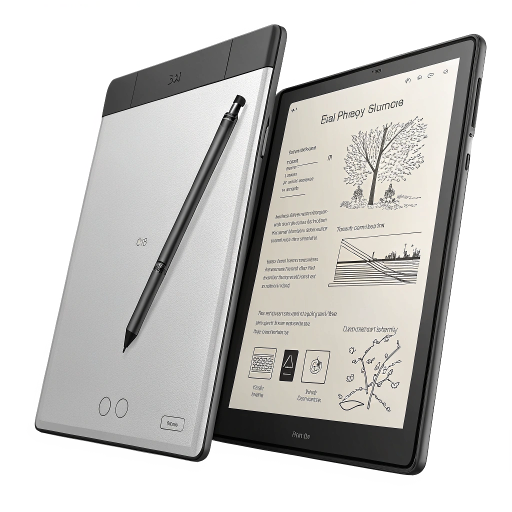
The reMarkable 2 bills itself as “the world’s thinnest tablet,” and at just 4.7mm, it feels impossibly sleek and premium in your hands. But its true magic lies in its screen technology and the seamless writing experience it provides. This is a device built from the ground up for one purpose: to be the ultimate paperless writing tablet.

- THE ONLY TABLET THAT FEELS LIKE PAPER – With a paper feel never before experienced on a digital device, reMarkable 2 red…
- DO YOUR BEST THINKING – reMarkable has no app store, no pop-up ads, notifications, or social media so you can stay focus…
- WHAT’S IN THE BOX – You’ll find reMarkable 2, a digital notebook for paper-like writing with 10.3″ black and white displ…
Key Features and Specifications:
- Display: 10.3” second-generation CANVAS display, a monochrome digital paper screen (1872 x 1404 resolution, 226 DPI). This is a cutting-edge e-ink writing tablet that mimics the look and feel of paper with stunning accuracy.
- Writing Experience: The screen has a unique, finely textured surface that provides a satisfying friction when writing. Paired with the Marker or Marker Plus, which require no charging, it delivers an incredibly low-latency experience that feels remarkably close to writing on real paper.
- Design & Build: Anodized aluminum frame, ultra-thin profile, and lightweight (403.5 g). It feels durable and looks like a premium piece of technology designed for professionals.
- Software & Connectivity: Runs a custom Linux-based OS (Codex) focused solely on notes, PDFs, and ebooks. It features Wi-Fi connectivity, USB-C, and seamless cloud synchronization to desktop and mobile apps.
- Battery Life: Weeks, not hours. Thanks to the power-efficient E Ink display, you can expect up to two weeks of battery life on a single charge with regular use.
- Accessories: The reMarkable 2 is part of an ecosystem. The Marker and Marker Plus (with a built-in eraser) are essential, as is one of the stylish Folios for protection.
This smart writing pad isn’t trying to be a multimedia powerhouse. It’s a focused tool for writers, students, executives, and anyone who spends their days reading, annotating, and creating notes.
Performance & User Experience:
After spending several weeks using the reMarkable 2 as my primary note-taking device, the experience can be summarized in one word: focused. The complete absence of apps, notifications, and even a web browser is not a limitation; it’s the core feature.
The writing feel is simply unparalleled in the digital writing tablet market. The combination of the textured screen surface and the custom Marker tips creates a tactile sensation that other glass-screen tablets can’t replicate. There is a tangible sense of friction—a “bite”—that makes writing feel controlled and natural. Latency is virtually non-existent, so the ink appears on the screen the instant the pen touches it.
Pros:
- Sublime Writing Feel: Truly feels like writing on a high-quality paper notebook. It’s the best digital writing experience we’ve tested.
- Distraction-Free Environment: The minimalist OS forces you to focus on the task at hand—be it brainstorming, editing a PDF, or taking meeting notes.
- Exceptional PDF Handling: Reading and annotating large PDF documents is a breeze. For academics, lawyers, and researchers, this feature alone could justify the price.
- Superb Organization: The file system of notebooks, folders, and tags makes it easy to organize thousands of pages of notes and find what you need quickly.
- Excellent Battery Life: You can genuinely forget about the charger for a week or two at a time, making it a reliable companion for travel and long workdays.
Cons:
- No Backlight: The E Ink screen relies on ambient light, just like paper. This means you can’t use it in the dark without an external light source, a major drawback compared to competitors like the Kindle Scribe.
- High Price of Entry: The tablet, marker, and folio are all sold separately, making the initial investment quite high.
- Subscription Model for Full Functionality: Key features like cloud storage integration (Google Drive, Dropbox) and handwriting-to-text conversion are locked behind the optional “Connect” subscription.
The user experience is a deliberate trade-off. You lose the versatility of an iPad but gain a powerful tool for concentration. For writing tablets for adults who need to think and create without interruption, it’s a trade worth making.
Comparison with Similar Products
The e-ink tablet market has become more competitive. To see where the reMarkable 2 stands, let’s compare it to two of its main rivals: the Amazon Kindle Scribe and the Onyx Boox Note Air3 C.
| Feature | reMarkable 2 | Amazon Kindle Scribe | Onyx Boox Note Air3 C |
| Writing Feel | Paper-like (Best in class) | Smooth glass feel | Textured glass feel |
| Screen Type | 10.3″ E Ink CANVAS | 10.2″ E Ink Paperwhite | 10.3″ E Ink Kaleido 3 (Color) |
| Backlight | No | Yes (Warm & Cold) | Yes (Warm & Cold) |
| App Ecosystem | None (Closed OS) | Kindle Store & Notebooks | Full Android 12 (Google Play) |
| Primary Use | Focused Note-Taking & PDF | Reading & Note-Taking | All-Purpose E Ink Tablet |
| Price (Tablet + Pen) | High | Mid-Range | High |
Key Differentiators:
- reMarkable 2: Its singular focus is its greatest strength. It offers the most authentic writing experience by a wide margin, making it the top choice for pure tablets for note-taking.
- Kindle Scribe: A fantastic e-reader that has gained excellent note-taking capabilities. The inclusion of a backlight and seamless integration with the massive Kindle ecosystem makes it a better choice for avid readers who also want to take notes.
- Onyx Boox Note Air3 C: The jack-of-all-trades. With a color E Ink screen and full access to the Google Play Store, it can run Android apps like OneNote, Gmail, and Chrome. However, this versatility comes at the cost of battery life and the focused environment that makes the reMarkable special.

- Screen: 10.3″ Kaleido 3 (4,096 colors) Carta 1200 glass screen with flat cover-lens. Resolution: B/W: 2480 x 1860 (300 p…
- CPU: Octa-core + BSR. RAM: 6GB ROM: 64GB Connectivity: Wi-Fi + BT 5.1. Front Light with CTM (Warm and Cold) G-sensor for…
- Document Formats: PDF, CAJ, DJVU, CBR, CBZ, EPUB, EPUB3, AZW3, MOBI, TXT, DOC, DOCX, FB2, CHM, RTF, HTML, ZIP, PRC, PPT,…
Pricing & Value
The reMarkable 2 is positioned as a premium product, and its price reflects that. The tablet itself is just the starting point.
- reMarkable 2 Tablet: ~$299 (Prices fluctuate)
- Marker / Marker Plus: ~
79/ 79/129 - Book Folio / Type Folio: ~
79/ 79/199
A complete starting bundle will likely cost over
2.99/month), which unlocks unlimited cloud sync, integration with Google Drive/Dropbox/OneDrive, handwriting conversion, and screen sharing.
So, does it provide good value? The answer depends entirely on your needs. If you’re looking for a cheap writing tablet, this is not it. However, if you are a professional or student who buys dozens of notebooks a year, prints hundreds of pages of documents for review, and values a dedicated space for deep work, the reMarkable 2 can be a worthwhile long-term investment. It’s a tool for productivity, and for the right user, the value it provides in improved focus and organization can far outweigh the initial cost.
Customer Reviews & Feedback
User feedback for the reMarkable 2 is generally polarized around its core philosophy. Those who embrace its minimalist nature are overwhelmingly positive.
- A user on a popular tech forum writes, “I’ve had my rM2 for two years. It has completely replaced all paper in my life. The focus it gives me is something I can’t get from my iPad. It’s for working, not for playing.”
- Another review from a university student states, “Being able to have all my textbooks as PDFs and all my lecture notes in one light device has been a lifesaver. The battery lasts forever, and I’m not tempted to browse social media during class.”
Common criticisms almost always center on the lack of a backlight and the price. Some users feel that essential features are unfairly locked behind the Connect subscription. However, the chorus of praise for its paper-like feel and distraction-free experience is a consistent theme across thousands of reviews.
Pros, Cons & Expert Analysis
Here is a summary of our findings for this premium electronic notepad.
Pros:
- Best-in-Class Writing Experience: The textured CANVAS display provides an unmatched, paper-like feel.
- Premium, Ultra-Thin Design: A beautifully crafted device that is a pleasure to hold and use.
- Completely Distraction-Free: The lack of apps and notifications is a powerful feature for promoting deep work and focus.
- Outstanding Battery Life: Lasts for weeks, making it a reliable tool for any environment.
- Excellent for PDF Annotation: A superior device for anyone who needs to read and mark up documents.
Cons:
- No Backlight: Unusable in low-light conditions without an external lamp.
- Expensive Ecosystem: The total cost including essential accessories is significant.
- Paywalled Features: The Connect subscription is needed to unlock its full cloud and sharing potential.
- Slower Processor: Page turns and file loading can feel sluggish compared to a traditional tablet.
Expert Analysis:
As a content strategist, the reMarkable 2 is not just a gadget; it’s a workflow philosophy. It excels as a “thinking tool.” It’s the digital equivalent of a quiet room and a blank sheet of paper. While competitors offer more features (color, apps, backlights), they do so by sacrificing the very focus that makes the reMarkable 2 so powerful. It is the best writing tablet for individuals who need to disconnect to connect with their ideas.

- 4 Pack for More Fun: Apply the newest flexible liquid crystal technology, brighter and clearer than most LCD writing tab…
- 8.5 Inch Colorful Lcd writing Tablet: TQU kids LCD doodle board is a creative education and learning toy, perfect suppor…
- Easy to use and Durable: The LCD writing tablet for kids is easy to use, just use the stylus to write, draw, scribble, d…
Final Verdict
In a market flooded with do-it-all devices, the reMarkable 2 dares to do less, and that is its genius. It is, without a doubt, the best writing tablet on the market for those who prioritize the tactile sensation of writing and a truly distraction-free environment. Its gorgeous design, phenomenal battery life, and unparalleled paper-like feel make it a joy to use for its intended purpose.
While the high cost and lack of a backlight are valid concerns, they don’t detract from its core mission. If you are a writer, student, academic, or professional drowning in paper notes and digital distractions, the reMarkable 2 isn’t just a good product—it’s a necessary tool. It’s an investment in your focus.
Ready to transform your productivity and experience the future of paper? Check the latest price and reviews on the reMarkable 2 now!
FAQs
What is the best writing tablet for taking notes?
For pure note-taking and a paper-like feel, the reMarkable 2 is widely considered the best option due to its textured CANVAS display and distraction-free software. If you also need to read in the dark and want Kindle integration, the Amazon Kindle Scribe is a strong alternative.
Can the reMarkable 2 replace paper notebooks?
Absolutely. With its excellent organizational features, cloud backup, and authentic writing feel, the reMarkable 2 is designed specifically to replace all of your paper notebooks and printed documents in one lightweight, digital device.
Is the reMarkable 2 worth it in 2025?
Yes, for the right user. If your primary need is a focused digital device for writing, reading, and annotating PDFs without the distractions of a traditional tablet, the reMarkable 2 remains a top-tier choice and a worthwhile investment in productivity.
Does the reMarkable 2 have a backlight or color screen?
No. The reMarkable 2 has a monochrome (black and white) E Ink display and does not have a built-in backlight. It relies on ambient light, just like a real piece of paper, which contributes to its long battery life and paper-like appearance.
Do you own a reMarkable 2 or another e-ink tablet? Share your experience and thoughts in the comments below!